
Updating client information
| ℹ️ If a client needs help figuring out where to edit their profile information, direct them to go to the “My Account” tab in their profile. From there, they can edit certain information as needed. |
Changing account emails
| ⚠️ Clients cannot change/update their emails on their own. They must request assistance from us. |
Resetting account password
If a client wants to reset their account password, instruct them to follow these steps:
- Select “Forgot your password?” while attempting to sign in.
- In the form field, enter the email address associated with your Cerebral account.
- Check for an email in your inbox titled "Reset your Cerebral password."
- If you don't see the email, check your spam or promotional folder in your email inbox. Sometimes the email can take a few minutes to show up in the inbox as well.
- Once you’ve accessed the "Reset your Cerebral password" email, you can change your password by clicking on the button in the email.
- You will be redirected back to our main website to a page that says "Reset password for your account."
🗒️ Additional considerations:
|
Changing a client’s plan
⚠️ Clients cannot change their plan on their own [with the exception of twice a month plans, which clients can change to directly from their account dashboard. For all other plan changes, clients must submit a request to the Support team for assistance following these steps:
|
Change plan behavior
✅ Direct clients to Affordable Meds plans.
|
Pause requested
If a client has questions around what it means to pause their account, we can send the following macro where they reached out after editing appropriately:
Hi [client name], we can help you pause your account for up to 2 months instead of canceling it. While paused, you won't incur any new subscription fees and your care team will stay assigned to you. Any additional costs such as copays remain your financial responsibility.
Please remember that while your account is paused, your treatment plan and upcoming sessions will be cancelled. You also won't be able to message your care team.
[If on a medication-inclusive plan, add: Talk to your prescriber before pausing, as stopping medication or treatment suddenly can be risky. They can help you pause safely.]
If you want to pause your account or have questions, let us know.
| ℹ️ Cerebral’s Terms and Conditions state that Clinicians are not able to meet with clients while they are physically located outside of the United States and its territories. If a client informs us that they will be traveling internationally and specifically requests to pause their account, we can proceed with the steps below. |
Reactivation
| ℹ️ Clients will have the option to reactivate into the plans noted in our Cerebral Plans > Cerebral Plans SOP as available to reactivators. Effective 2/4/25, the $0/month in-network insurance plan will be available to 100% of clients in the reactivation flow. |
| ⚠️ Before a client reactivates their account, they must pay any previous balance that is still owed. |
| 🗒️ Effective 3/4/24, reactivating clients who select a Prescriber that they have met with in the last year will have a 20 minute initial session instead of our standard 40 minutes. |
Client initiated reactivations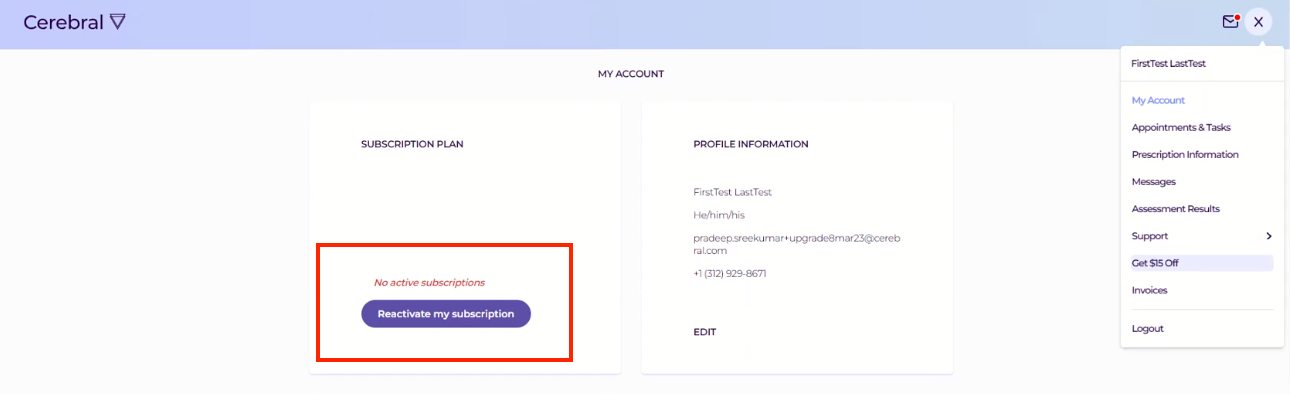
- If a client wants to reactivate their account, they can reactivate their subscription by logging into their Cerebral account and clicking the ‘Reactivate my Subscription’ button.
- From there, clients will enter their payment and billing information then proceed with the rest of our typical registration flow, including redoing their assessment.
- If a client wants to reactivate onto a different plan with a lower cost, they can reactivate their subscription and request a plan change, then we can process a refund for the difference in prices.
- If a client requests to get assigned to their previous clinician upon reactivating:
- Check if the clinician is available to take new clients in AirTable.
- [For Therapists] If no, create a Leadership Escalation > Previous Therapist Requested Unavailable EMR Task to ask the clinician if they can add the client to their caseload.
- [For Prescribers], If no, assign the client to a new prescriber following our Client Requested Reassignments > Reassignments via EMR Auto-Generated Suggestions SOP.
- If a client scheduled for cancellation asks to reactivate their account, abort the cancellation.
If a client reaches out confused regarding reactivation and was not expecting to be charged, send the following macro where they reached out after editing appropriately:
Hello [client name], we are sorry for any confusion.
When we say reactivation is free, we mean there is no reactivation fee. But you still have to pay your regular monthly subscription fee when you reactivate.
We hope this clears things up. If you have more questions, please contact us.
ID verification
| ℹ️ ID Verification is utilized as a pre-session task, which gives clients the ability to upload their ID on their own time instead of during the sign up process. Clients will be reminded to complete any pending ID Verification Tasks via automated outreach sent via email and text. |
⚠️ All clients MUST have a valid, government-issued photo ID on file in the ‘Images’ tab of their EMR.
|
If a client has not uploaded a photo of their ID, the Clinician will create a Client notifications > Have the client upload a valid ID EMR task for us to educate the client to complete via their ‘To-Dos’ in their account. In that scenario, follow these steps:
- Open the client chat within the task.
- Select the "Ad hoc" dropdown.
- Select "Client To-Do's".
- Select "Upload valid ID".
- Select "Send to client".
Unsubscribe requests
| ℹ️ Some messages related to factors of a client’s care such as payment, medication shipment, session confirmation, and session reminders are considered transactional and therefore cannot be unsubscribed from. All other communications are considered marketing material and can be unsubscribed from by navigating to the ‘Communication Preferences’ section of the “My Account” tab. |
| Clients can unsubscribe from Cerebral emails by clicking “unsubscribe” at the bottom of their Cerebral emails. | |
| SMS texts | Clients can unsubscribe from Cerebral SMS texts by replying “STOP” to text messages. |
| Push notifications |
|
|
| 🗒️ If a client is having difficulties unsubscribing themselves using the aforementioned methods, please fill out our two-question Client Unsubscribe Request form to manually unsubscribe clients from future communication. Once submitted, a subscription manager will unsubscribe the client. |
Data deletion requests
ℹ️ A data deletion request is defined by any time an individual asks to have their personal data removed from Cerebral’s records. Examples include, but are not limited to:
|
If we receive a data deletion request, route to a live agent.
Comments
0 comments
Article is closed for comments.